
A small business doesn’t need to file a separate tax return if it’s set up as a sole proprietorship or an LLC taxed as a sole proprietorship. Income from the business is included on a Schedule C in the owner’s personal tax return. A revocable living trust is a “disregarded entity” under federal tax law. Income in a revocable living trust is treated as earned by the grantor.
Separate Tax Returns and K-1s
If the business is set up as a partnership, an S-Corp, or an LLC that chooses to be taxed as an S-Corp, it must file a separate tax return and issue a Schedule K-1 to the owner(s). An irrevocable trust or an estate must also file a tax return for itself and issue a Schedule K-1 to the beneficiaries. The owner or the beneficiary then includes income and deductions from these K-1s on their personal tax return.
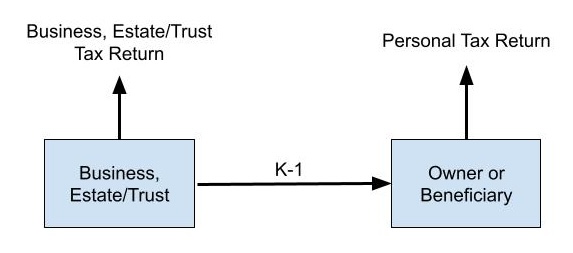
Some tax software products marketed to consumers have a “Home and Business” or “Self-Employed” edition, but the “business” or “self-employed” component only refers to Schedule C. These consumer tax software will accept K-1s issued by a business, a trust, or an estate as inputs, but they don’t produce the tax return for an irrevocable trust or an estate, a partnership, an S-Corp, or the associated K-1s.
You’d have to buy a separate product if you need to file Form 1041 for a trust or an estate, Form 1065 for a partnership, or Form 1120-S for an S-Corp. Software that generates these tax returns is more expensive than software for personal tax returns. TurboTax Business sells for $134 on Black Friday (the list price is $190). TaxAct Business sells for $140 to $165. These business tax software products are completely separate from the regular TurboTax or TaxAct. They don’t include personal tax returns.
H&R Block is an exception. Its Premium & Business edition can do both personal tax returns and business or trust/estate tax returns. You can buy it for as low as $50 when it’s on sale at Amazon, Newegg, or Walmart. Considering that H&R Block’s Deluxe + State edition, which only does personal returns, sells for $30 when it’s on sale, you only pay $20 extra for the business program. Even if you use something else for your personal return, paying $50 only to use the business portion of the software is still a lot less expensive than the alternatives.
This post isn’t sponsored by H&R Block or anyone else. I’m only writing as a user of this software since 2018.
Two Apps in One Package
H&R Block Premium & Business installs two distinct apps on the computer: H&R Block Premium and H&R Block Business. H&R Block Premium is the normal software for personal tax returns. It supposedly includes more features than the Deluxe + State edition, but I don’t see much difference. H&R Block Business is the software for business and trust/estate returns. It’s a separate app developed by ATX for H&R Block. ATX, owned by Wolters Kluwer, makes professional tax software for CPAs and tax preparers.
These two apps don’t interact with each other directly. You would take the K-1s produced by H&R Block Business and input them into H&R Block Premium or another software you use for your personal tax return.
H&R Block Business works, but because ATX primarily makes software for tax professionals who know what they’re doing, the software doesn’t include much handholding. There’s an interview, as in typical personal tax software, but there isn’t much explanation if you don’t understand the question. It feels like you’re just filling out tax forms one part at a time.
If you have a simple return or you can reference a prior-year return done elsewhere, the software does its job. You can e-file the federal 1041, 1065, or 1120-S, as well as the state return for a handful of states, or you can print and mail. If you need to create both a business return and a trust return, the same software can do both. I don’t see any limit on how many returns you can generate in H&R Block Business.
I’ve used H&R Block Business for several years. Here are some notes for new users:
Windows Only
H&R Block Premium for personal tax returns normally has both a Windows version and a Mac version. However, because H&R Block Business only works on Windows, the Premium & Business bundle only has a Windows version. You need a Windows machine to use H&R Block Business.
ARM Processor Not Supported
Furthermore, H&R Block Business 2025 doesn’t run on a machine with an ARM processor, because it uses RavenDB, which doesn’t work on Windows ARM64. This means you can’t run it in an ARM-based Windows virtual machine on a Mac with Apple Silicon. The 2024 and earlier versions didn’t have this limitation.
Most Windows PCs don’t use an ARM processor, but if yours does, you need to find a different computer to run H&R Block Business 2025.
Run as Administrator
H&R Block Business 2025 requires running as an administrator on Windows 11. Again, the 2024 and earlier versions didn’t require it. If you get an error launching H&R Block Business 2025 as a standard user, right-click on the shortcut and select “Run as Administrator.”
Backup Return
H&R Block Business keeps your tax return data in a local database. When you’re done with a return, you should create a backup by exporting the data to a file. The exported backup file can be read only by the software for the same tax year. For instance, you export a backup file myreturn.atx25Export with the 2025 software. This backup file can only be read by the 2025 software.
This YouTube video shows how to export a backup and restore from a backup:
Save the Installer
When you install H&R Block Business 2026 on the same computer next year, it can find the 2025 data in the local database and import it for 2026. It doesn’t use the exported backup file. However, if you switch to a new computer and install the 2026 software, it can’t import from the 2025 backup file. You need to install the 2025 software as well on the new computer and restore from the 2025 backup file. Then the 2026 software will find the 2025 data to import.
Therefore, don’t delete the original installer after you install the software. You’ll need it again if you switch computers. Save the installer and the activation code together with the exported backup for each year.
Form Release Dates
As with personal tax software, some tax forms become available only later in the tax season. ATX updates this web page with the estimated release date for each form:
https://taxcut.atxinc.com/taxcutformsstatus.aspx
Bookmark it and check when everything you need will be available.
***
H&R Block Business isn’t as user-friendly as tax software for personal tax returns, but it’s professional-grade in terms of its capabilities. Tax professionals can charge well over $1,000 for business and trust tax returns. It’s worth trying DIY with inexpensive software if you have a simple return or there are no major changes from last year. There’s a learning curve for anything new, but you’ll have a sense of accomplishment when you finish.
Security Issue in the 2025 Version
Computer security researcher Yifan Lu discovered a security issue in the 2025 version of the H&R Block Business program. If a computer with H&R Block Business 2025 installed connects to a network with a malicious setup to take advantage of the security vulnerability, the attacker can intercept your otherwise secure connections to other sites.
To reduce your risk of falling victim to this vulnerability, follow these steps to delete the root certificate installed by H&R Block Business 2025:
- Press the Windows Key + R to open the Run dialog.
- Type
certlm.mscand press Enter. (Click “Yes” if prompted by User Account Control).- In the left-hand pane, expand Trusted Root Certification Authorities and click on the Certificates folder.
- In the middle pane, locate WK ATX ServerHost 2024.
- Right-click the certificate, select Delete, and confirm the deletion.
Source: https://hrbackdoor.yifanlu.com (If you get a security warning from your browser when you click on this link, that means your computer isn’t affected. The issue only affects Windows machines because H&R Block Business only runs on Windows.)
If you must use H&R Block Business 2025 before deleting that certificate, keep the affected computer at home. Do not connect it to other networks. After you’re done using H&R Block Business 2025, delete the root certificate by following the steps above.
Learn the Nuts and Bolts
I put everything I use to manage my money in a book. My Financial Toolbox guides you to a clear course of action.
CFD says
Thanks for this info. I’m tempted to switch. Can H&R Block import my TurboTax data from the previous year (the .tax file) ?
Harry Sit says
The H&R Block app for personal tax can import TurboTax’s .tax20xx file for the personal tax return from last year. H&R Block Business can’t import anything from TurboTax Business.
Daniel A says
You can avoid a lot of headaches by not rushing to start a business/trust return, until you get a screen showing all the forms and interviews you’ll be using – are updated and available.
Intuit Blows says
Wow… I had no idea, thanks !!! Been paying way too much for Turbotax Business for years, just to do a simple 1120-S and was going to start doing the return on paper vs paying $130 for Turbotax. I hate Intuit and love saving money, so this is a double-win.
Francis Lee says
Thanks for the tip! I’m an LLC that will start to taxed as an S-Corp for 2026, so this will be my last year using TT for Home and Business 🙂
Charlie says
Thanks for this article, Harry.
I have read a number of comments about various 1041 software products not having a lot of handholding. I’m wondering which product is best, seems like H&R Block’s is the least costly ($65 at Walmart as I write this, compared to over $140 for TurboTax and Tax Act). Or maybe just do it by hand as there was not much activity. I’ve never done a 1041 before.
I had a parent pass away in 2025 and the only asset in the trust was a condo, which was sold in 2025. I obtained an EIN for the trust which will be shown on the 1099S soon. The proceeds were wired to a brokerage account I had set up with same EIN. I, as trustee, distributed the proceeds to myself as sole beneficiary. No other activity ensued.
I know there is a stepped-up basis, therefore, I will have a capital loss to show on the K-1 because of the selling expenses, etc. So the 1041 return will be both the initial and final return for the trust, which became an irrevocable trust upon the death of the parent.
Any suggestions are welcome.
Harry Sit says
I would do it by hand because it’s only one-time and the trust had only one activity. Software makes it easier when you do it every year.
Charlie says
Thanks Harry, that’s exactly what I did, prepared it manually, wasn’t that hard after all. The only significant thing was the capital loss which goes on K-1 and flows through to my return. There was no income whatsoever for the trust.
I’m ready to sign it, just waiting for the 1099-S to arrive to make sure it matches the 8949.
Charlie says
By the way, I did start the 1041 online with TaxAct software, they let you use it and only charge when you print or file. Unfortunately, their customer support is lacking. I had a couple of minor questions and they only had voicemail and never called back. That was another reason for me to do mine manually. I have the impression, none of the companies, have a lot of expertise with 1041’s, the software is more often utilized for 1065’s and 1120’s.
Kat says
Thank You for the tip on running the H&R Block Business software for 2026 as an Administrator. I was having a problem figuring out why the software wouldnt run this year, and found your article in my research. Been using H&R Block Premium Business since 2011, each year its a new mystery to solve.
Anne says
Wow! This article is sooooo helpful! We are needing to file 2 irrevocable trust returns (issuing K-1’s) and then 2 individual returns (entering the K-1’s)! I was finding it so frustrating to navigate both Turbotax and H&R’s websites to figure out what we needed. Your article explained it so clearly! I understand it now, finally! Turbotax would be way more expensive for the 2 separate-purchase versions we’d need to get. H&R Premium & Business a much better deal, and having 2 distinct installations will work just fine for our scenario. And all your extra tips for working with the H&R software is the cherry on top! THANK YOU!
Ken says
Very helpful information Harry. I’ve been using H&R Block Business software for several years for both a Trust return (1041) as well as several personal returns. My major complaint about this software if that you CANNOT efile Trust returns (1041). You must print out and mail the return. I don’t know if this is true of the competitors software, but it’s a major PITA when trying to file Trust returns within H&R Block Business.
CFD says
I did a simple 1065 for my rental property LLC using the HRB software today. What Harry said is true… The HRB business software serves to put the numbers on the forms and will send the return to the IRS electronically, but there is little to no explaining / handholding. If you don’t know already understand the forms it’s not a great help. For years I have done this biz return using a homebrew spreadsheet that did the math for me — numbers that I typed into pdf forms from the IRS website that I then printed, signed and mailed. That old way was easier, frankly, vs what I did this year using / learning the HRB software, but my LLC’s 1065 is a very simple return. And maybe future years will be easier for me when HRB can blow in info from the prev year’s return.
Harry Sit says
A computer security researcher discovered a serious security issue in the H&R Block Business 2025 program. I added a new section at the end, with instructions from the researcher on how to address the issue.