Do you use an online checking account such as Ally, Capital One 360, USAA, Fidelity, or Schwab? If you do, here’s a challenge:
How do you deposit cash to it?
It would be cheating if you first deposit the cash to a local, brick-and-mortar bank and then transfer it to your online bank. In that case you are not really depositing to your online bank. It also means you have to maintain a local, brick-and-mortar bank account.
It’s very easy to deposit a check to an online bank account. If you are not in a hurry and if you trust the Postal Service, you can just mail it. Many online banks also offer remote deposit by smartphone or computer scanner. USAA accepts check deposits at UPS Stores. Fidelity takes checks at their local offices.
Depositing CASH? Not so easy. You know you are not supposed to send cash by mail. UPS Stores don’t accept cash deposit for USAA. Fidelity’s local offices don’t take cash either. Take a picture of the cash with your smartphone? Good try.
Buy a money order and then do the deposit by mobile phone? First, a money order costs money. Second, you want to check to see if the mobile deposit app accepts money orders. Mobile apps from Ally, Capital One 360, and Fidelity all don’t accept money orders.
I recently had to deposit some cash. I used this state-of-the-art device that sits outside our cafeteria at work. It took my cash, counted the bills, deposited it, and then gave me a receipt. All done in less than 1 minute.
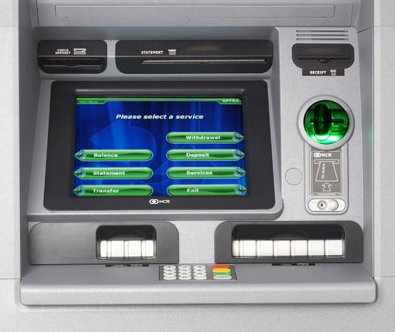
Wait, did I say online account? Yes, I use Alliant Credit Union*. There is no branch near me. Alliant Credit Union contracts with several ATM networks. Many contracted ATMs take deposits.
I use the same machine for depositing checks. It beats any mobile app by a long mile. When I tried a few mobile deposit apps, they would reject the pictures half of the time. I had to retake the pictures and resubmit, sometimes several times. Very frustrating. With the industrial-grade machine, I can feed multiple checks in one shot. It doesn’t matter whether I feed them face-up or face-down. The machine reads the front and the back and the amount on the checks in one pass. It prints a summary or thumbnail images on the back of the receipt. Beat that, iPhone app!
Among all the major online banks — Ally, Capital One 360, USAA, Fidelity, Schwab — Alliant Credit Union solves this depositing problem most elegantly.
Bluebird Account
If you’d rather not switch banks, you can get a Bluebird account by American Express and deposit cash at any Walmart store. Bluebird account is an online account with no minimum balance and no monthly fee. Once you deposit the cash, you can use the money to make purchases at stores, pay any bills with its online billpay, or transfer the money to a linked bank account.
Learn the Nuts and Bolts
I put everything I use to manage my money in a book. My Financial Toolbox guides you to a clear course of action.
Maggie says
Do you know which one of Alliant’s ATM networks takes deposits? I’ve had trouble finding any. Thanks!
Ryan says
I’ve heard that deposits can be made to Alliant using U.S. Bank’s ATMs. However, I am confused about what to put on the deposit envelope. Did the ATM that you used require an envelope?
Harry Sit says
Maggie – Alliant’s ATM locator page has a checkbox for “Deposit Taking ATMs.” The deposit taking ATMs around me belong to the CO-OP network, Alliance One, and U.S. Bank. When I plug in a random zip code, I see some Allpoint ATMs also take deposits.
Ryan – Yes, U.S. Bank is a sponsor of MoneyPass ATM network, which Alliant also uses. If the ATM requires an envelope, I don’t put anything on the envelope. It isn’t necessary to use a deposit slip either. It knows where to deposit by the ATM/debit card number. I’ve used U.S. Bank’s ATMs to make deposits to Alliant CU account. No problem, but it has to be a U.S. Bank branch based ATM; the ones you see in airports or retail locations don’t work even though they say U.S. Bank.
Maggie says
Thanks for the help!
William says
Everbank allows online deposit using a scanner and your own computer. Further, they pay higher interest than any of the other banks mentioned in your article. I have used their online services for years. They guarantee a rate within 5% of the top rate in the country for money market and checking account. No fees. They reimburse all ATM fees. Why drive to an ATM machine to make a deposit. Use your scanner at home.
Anon says
Cash deposit.
Twat says
Cool so I can scan my counterfeit bills? Thanks for the advice!
Harry Sit says
William – They let you scan the cash too?
Ryan says
Thanks Harry! I’ll give it a try.
William says
Oops, Sorry! I never deposit cash, and so I was thinking only about checks. Oh well. I live in a cashless world I guess.
David C says
TFB, do you have an alternative way to obtain Medallion signatures and some of the other things a brick and mortar are good for? Are you able to get those through Alliant’s shared branching network?
Don’t get me wrong… since you left Wells Trade for TD Ameritrade it made sense to close the WF checking… just wondering about the “other” kinds of stuff brick and mortars are good for :-). I’m also not sure why I didn’t catch the fact that you closed the checking account back in your April 11th post… but you are talking to the guy who couldn’t find his 401k fee disclosure ;-).
Harry Sit says
David C – Transferring account from Wells Fargo to TD Ameritrade didn’t need a medallion signature. If I ever need one, I’m sure the local Fidelity or TD Ameritrade office will provide one, even if the very same form will transfer assets away from them. I never had a safe deposit even when I had the Wells Fargo account. I don’t think I will need one.
Alliant isn’t part of shared branching because it’s too expensive. I heard it costs the home credit union something like $3 per transaction.
I could’ve left the minimum amount necessary to keep the accounts open and fee-free, but it was too much hassle. I paid Wells Fargo $95 in order to close the accounts I don’t need.
David C says
@TFB (“Harry Sit”)
There is craig10x’s post (http://www.fatwallet.com/forums/finance/814399/m16586875/#m16586875):
[Alliant] [is] “unofficially” on the Cu shared service network…in other words, apparently they are but they try to keep it “hush hush” because of the high expense of those transactions…best thing to do
is try it in your closest Cu shared location…and if it works then great but whatever you do…don’t ask Alliant DIRECTLY about it…
FYI that seems to be backed up by a quick search at http://www.cuservicecenter.com (as of September 11, 2012 “Alliant CU” comes up in the search results). Shhhh… keep it a secret 😉
David C says
…and for what it is worth I interpret Alliant’s status on the cuservicecenter.com website to mean that 1) they are in the network (you can find them under the “Does my CU Participate?” link) but 2) they do not accept guest (other) CU users at their branch locations (a sampling of several Alliant branches including in Chicago and Houston do not show up in the Branch Locator)
The second point obviously wouldn’t impact an Alliant customer. Anyway I could easily be wrong… no warranties on this info :-).
Harry Sit says
David C – Thank you for the info. I heard they only participate in Hawaii. Being a member owner, I would respect its wishes to keep the cost low.
Roger S says
You state that USAA does not accept money orders thru the UPS Stores. Wrong – I do that all the time and there never is a hold of more than 30 minutes for the money orders (unless I deposit a large sum of $$$). Also, for those fortunate to live where “Check City” does business (I’m in Las Vegas), you can get all the Western Union m.o.’s you want for NO fee… no other transaction required!
Roger S says
PS: Your link to USAA’s faq is correct: They do NOT accept mo’s via the @Home mobile scanning APP, but they DO accept them at the UPS Stores.
Harry says
Roger S – Thank you for the info on depositing money orders to USAA at UPS stores. Perhaps USAA should update their FAQs for Easy Deposit.
“What types of checks can I deposit using USAA Easy Deposit?”
“You can deposit endorsed checks from U.S. financial institutions. The following check types cannot be deposited:
Cashiers check
Money order
Foreign check
Savings bond
Traveler’s check”
Jim says
I’ve been depositing checks, money orders, and bank drafts to my USAA accounts using the neighborhood UPS store for over six months now.
Lewis says
I have USAA and Ive been using U.S. Bank for deposit.. (ATM only)
Check it out.
🙂
ikomrad says
Jim – and this matters why? The article is about depositing cash into an online bank. If you are depositing cash using an ATM, please provide details.
Matt Rattan says
Can someone advise me as to what ATM I use to make a deposit to ALLY bank? Does Allpoint work? Need to deposit cash to Ally, and want to use an ATM
Harry says
As far as I know, Ally Bank doesn’t have this feature. Call or chat with Ally customer service to confirm.
Donna Pordel says
Thanks Harry for answering Matt, (I was wondering this too) but I thought Ally did accept ATM deposits, from the quote in your article:
“Among all the major online banks — Ally, Capital One 360, USAA, Fidelity, Schwab — Alliant Credit Union solves this depositing problem most elegantly. ”
I saw Ally’s name in that quote…
Harry says
Solving the cash deposit problem doesn’t necessarily mean accepting ATM deposits. You solve it with Ally and the other names mentioned by getting a Bluebird account and depositing cash at Walmart.
Tony Hellmore says
I was hoping to find out more on making a deposit to Ally too. That Bluebird charges you, read the fine print. Don’t want that. Making a deposit at an ATM is what I want
Harry says
Ally’s FAQ says you can’t deposit cash directly to Ally.
“Can I deposit cash?
Sorry, but we don’t accept cash deposits.”
The fine print for Bluebird says there is no fee for depositing cash at Walmart. As long as you don’t use ATM to take cash out of Bluebird (why would you if you are trying to deposit cash?), there is no fee. Where do you see that Bluebird charges you?
Adam says
Just found this out the hard way when I called Schwab. I was told I could deposit a money order on the app but have not done this yet.
Mario says
The problem with Ally and most online banks is converting that cash to a check so you can deposit it. I’m sure everyone here knows a family member or someone who has a brick and mortar bank checking account. Just give them the cash and ask them to write you a check. Doesn’t cost a dime. Then you can deposit that check with your smartphone app. These days there isn’t a lot of need to be depositing cash constantly. But if you do, then maybe you shouldn’t have an online bank account.
Moni says
Capital One 360 now accepts cash deposits at the Capital One atms
mdades says
how do I deposit cash into a bank account if I cannot do it in person?
i’m stuck in hospital
long-term, and I thought
I might try one of the
legal bicycle messenger
services, if I can find one
that is bonded/insured
to carry cash. but I cannot
seem to find one in
san francisco through an
internet search. also, i’m
not quite sure of the best
physical way is to handle
this. ask the bank (b of a
or wells fargo) to send
me a locking depost bag,
put the money in it with
an official deposit slip
from my check book, and
have the messager put
it in a slot at the bank? or
hand it to teller and get a
receipt? and how do I
prove what was in the
bag for the insurance to
be good? show it to the
messanger and get a
receipt from them?
thanks.
Tina F. says
FYI, currently, there no Capital One 360 ATM’s in my area taking cash deposits. This has just been verified by one of the CSR’S I spoke with at Capital One 360. I reside in the Tampa/St. Petersburg area in Florida. Hope this is helpful, and that it changes soon 🙂
Julie Terrell says
I just went through the exercise today of trying to find an ATM or any other Capital One location that would accept cash in FL. There are none. I did ask that they get something in FL….there are some 360 Cafe locations sprinkled around the US but again nothing in FL
Sam Seattle says
Wow, never knew that I could SAFELY deposit cash into an ATM machine. Great info! Thanks so much, Harry.
Dan says
Anyone had any luck trying this with fidelity cash management account I went to nearest alliant deposit cash/check atm’s I have near by here in Los Angeles. After I did the prompts at the atm to deposit cash I got a “transaction did not recognize request
error” message twice with my fidelity atm card. Still looking for an atm that accepts CASH since I receive tips from my night job need this cash saved.
Harry Sit says
You need an Alliant Credit Union account and you use the Alliant Credit Union debit card to deposit the cash to the Alliant Credit Union account. You can join Alliant Credit Union free if you are a PTA member or you can make a one-time $10 donation to a supported charity.
Patrick says
Hi,
Thanks for your article.
I moved to Europe and I have 2 questions:
-I don’t have Alliant Credit Union account yet. Once I opened it, should i wait to receive the credit card to deposit cash or can I deposit the cash only using the account number?
Because I expected someone to deposit the cash for me. He doesn’t have local, brick-and-mortar bank account.
-Then can I transfer the money from my Alliant Credit Union account to my new European account?
Harry Sit says
Patrick – If you are having someone else deposit cash to your account, you are better off doing it through a bank or credit union with a physical branch near that person. That person can then deposit by using only your account number at that bank or credit union. That person doesn’t need an account himself.
AT says
Welcome to Ally’s Live Chat. Thanks for joining us! A Customer Care Associate will be with you in a moment. You are number 1 in the queue. Thank you for waiting.
You are now chatting with ‘Bank’s representative’
AT: Hi Bank’s representative
Bank’s representative: Thank you for chatting with me today. How can I help you?
Bank’s representative: Hi AT, how are you tonight?
AT: Just wondering, I am going to open my first checking account with Ally
AT: am good, thanks
Bank’s representative: Great!
AT: I just migrated to US and don’t have any account in US yet
AT: I wonder can I make first deposit by cash?
AT: to open an account
Bank’s representative: We do not accept cash.
Bank’s representative: Here are the requirements for opening an account with Ally:
Bank’s representative: Must be a US Citizen or legal Permanent Resident.
Must have a U.S. street address (not just a P.O. Box).
Must be at least 18 years of age.
Must have a Social Security Number (SSN) or a Taxpayer Identification Number (TIN).
AT: I have met all those requirements
AT: http://thefinancebuff.com/deposit-cash-to-online-bank-account.html
AT: I have been reading above article
Bank’s representative: Great!
AT: not sure that applicable with Ally
AT: basically, it said I can make first deposit via cash deposit on ATM machine
Bank’s representative: I have no access to Internet for security reasons.
Bank’s representative: Ally owns no machines, so that is not possible.
AT: okay got it
Bank’s representative: 4 WAYS TO DEPOSIT FUNDS
We offer four easy ways to deposit funds into an Ally account. The most common way is by electronic, or Automated Clearing House (ACH), transfers from a linked external account. This link is set up by using the routing and account numbers. You can also make a deposit by mailing in a money order or check, scanning a check from home and uploading it using our eCheck service, or wiring funds from an external bank. Unfortunately, we are not able to accept cash for deposit.
Bank’s representative: Is there anything else I can assist you with tonight?
AT: that’s all I have my answer that it is not possible to deposit the cash as per article mentioned
AT: thanks
Harry Sit says
I didn’t say you can do it with Ally Bank?
Bironology says
Sorry pals, but clearly you still need to maintain the obligatory local brick n’ morter account. I use Ally primarily because they are reputable, reliable, and have the best APY for a no-min savings account – a no brainer, really. ACH transactions work well, online experience good, mobile app is great, and deposit of checks with mobile app is a breeze. No complaints.
But, when I have cash to deposit, I don’t feel comfortable sticking large sums of cash into a machine, even if Ally supported this. I’m not talking about $100 deposit here – if its $100 it stays in my wallet. There are (rare) occasions when you have large sums of cash to deposit, such as kids birthdays, wedding gifts, baby showers, etc. Once the bill acceptor takes it from your hand, that’s it! If the transaction processing goes awry, you are cashless and have no recourse, so there’s NO WAY I’m putting a 4 or 5 digit sum of cash into a metal box and trusting the software, hardware, and network connection to work correctly.
For this reason I maintain a savings account at a local credit union which has very pretty and friendly tellers that I am perfectly happy interacting with as human beings and brokering the exchange of my precious and irreplaceable cash into their institution.
2 minutes later in the car I schedule the ACH transaction with Ally’s mobile app. Done, mischief managed.
Don’t overthink it.
Jim says
Detail you left out about having to wait 10 days for a official bluebird card before you can xfer to a bank, now I have hundreds just sitting there